Choices and loops
Choices
Pick between two things with condition ? this : that, or use {if} blocks for whole lines:
{sprinting ? "&aRunning" : "&7Walking"}
{if health < 6}
&cLow health!
{elif health < 15}
&eGetting low
{else}
&aHealthy
{end}

Compare with ==, !=, <, <=, > and >=, and combine with and, or and not. in checks whether something is in a list or a piece of text, as in {if held.id in ["minecraft:bow", "minecraft:crossbow"]}.
0, empty text, empty lists and missing values count as false, so {if held} means "if I'm holding something". or gives the first value that isn't false, which makes defaults easy: {held.name or "Nothing"}.
Note
A line that ends up with nothing on it is hidden, so an {if} that is false or an empty value doesn't leave a gap. Blank lines you type yourself are kept.
Loops
{for ... in ...} repeats everything up to its {end} once for every item in a list. Inside a loop, loop.index counts from 1, and loop.first and loop.last tell you where you are, which is handy for separators:
&7Effects: &f{for e in effects}{e.name}{if not loop.last}, {end}{end}

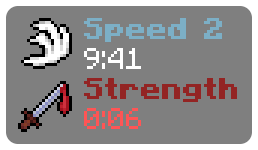
Loops can span several lines too. This one shows each effect with its icon, its name in the effect's own color and its level as a number, skips Jump Boost, and turns the time red in the last 10 seconds:
{for e in effects}
{if e.id not in ["jump_boost"]}
{e.icon(2)} {e.color}&l{e.name}{if e.level > 1} {e.level}{end}
{e.duration <= 10 ? "&c" : "&f"}{e.time}
{end}
{end}
Tip
Lines with only {if}, {for}, {end} and the like on them disappear, so indenting your logic onto its own lines won't leave blank lines in the HUD.
Effect ids on 1.8.9 are speed, slowness, haste, mining_fatigue, strength, instant_health, instant_damage, jump_boost, nausea, regeneration, resistance, fire_resistance, water_breathing, invisibility, blindness, night_vision, hunger, weakness, poison, wither, health_boost, absorption and saturation. Not sure of one? Show {e.id} for a moment. You can also filter by kind, with {if not e.ambient} to hide beacon effects or {if e.harmful} to only show bad ones.
You can loop over lists you write yourself:
{for id in ["iron_ingot", "gold_ingot", "diamond", "emerald"]}{item(id).icon}&f{item(id).count} {end}

Your own variables
{set name = value} stores something to use later:
{set hp = health + absorption}
&cHP &f{round(hp, 1)}
Comments
{# anything in here is ignored #}
Mistakes
If the script can't be read, the HUD shows what is wrong and on which line:
&aHP {helth}

Problems while running, like dividing by zero, show in red where the value would have been, and the rest of the HUD keeps working:
&aSpeed {speed / 0} m/s
