Text and values¶
Text and colors¶
Text shows exactly as you write it, and each line of the script is a line in the HUD. & codes change the color and style of everything after them.
&00 &11 &22 &33 &44 &55 &66 &77 &88 &99 &aa &bb &cc &dd &ee &ff

&lBold&r &oItalic&r &nUnderline&r &mStrikethrough
&#FF8800Hex colors 7CCFFlike these

| Code | Does |
|---|---|
&0 to &9, &a to &f |
The 16 Minecraft colors |
&#FF8800 |
Any hex color |
&l &o &n &m |
Bold, italic, underline, strikethrough |
&r |
Back to the HUD's own color, style and size |
§ works the same as &. Unlike vanilla, a color doesn't turn off bold and the like, so &l&0 and &0&l are both bold black. Only &r resets, and every line starts fresh.
Tip
Write \{, \} or \& to show those characters as text, \n for a new line and \t for a column.
Values¶
Anything in {braces} is filled in with a live value:
&7X &f{block.x} &7Y &f{block.y} &7Z &f{block.z}
&cHealth &f{health}&7/{max_health}
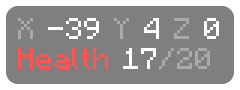
Some values have parts, reached with a dot, like {facing.short}, {held.name} or {memory.used}. Writing the value on its own, like {facing} or {held}, shows its name. The reference lists them all.
You can do math, like {health / max_health * 100}, and join text, like {"HP: " + health}.
Numbers¶
Values look and refresh the same way as the EvergreenHUD element that shows them. {x} shows -38.47 and {y} shows 72.00, like the Position element, and {fps} changes once a second, like the FPS element. Numbers you work out yourself show up to 2 decimal places.
&7x &f{x}
&7round(x, 1) &f{round(x, 1)}
&7floor(x) &f{floor(x)}
&7exact(x) &f{x | exact}
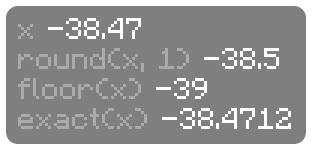
| Write | Shows |
|---|---|
{round(x, 1)} |
-38.5 |
{fixed(x, 3)} |
-38.471, always with 3 decimals |
{floor(x)} |
-39 |
{x \| exact} |
Every digit the number has, like -38.4712 |
{signed(y)} |
+72 |
exact is great for reach: {reach | exact} shows it to about 15 decimals.
Pipes¶
{value | function} passes the value to a function, which reads nicely for formatting, like {name | upper}, {x | round(1)} or {e.level | roman}. You can chain them:
{dimension | replace("_", " ") | title}
turns the_nether into The Nether.